- Make sure your TV and Set-Top Box are turned on.
- Press and hold <SETUP> on your remote.
- Release <SETUP> when a mode key flashes twice. All back-lit keys will stay on.
- Find your TV brand from the list below:
- Point the remote at your TV. Press and hold the number key for your TV until it turns off, then release.
- Test the volume and power button.
- If your brand is not found or if the volume and power buttons don’t work, follow the automatic TV code search.
Automatic TV Code Search
- Make sure your TV is turned on.
- Press and hold <SETUP>.
- Release <SETUP> when a mode key flashes twice. All back-lit keys will stay on.
- Press and release the <TV> key. It will stay lit.
- Press and hold <OK> as the remote tests codes.
- Release <OK> immediately when the TV shuts off.
- Point the remote at the TV and press <POWER>. If your TV turns on, test the volume. If the power or volume do not work, see our direct programming guides at www.goctc.com or call our help desk 24/7 at 218-454-1234.
CTC TV Remote
|
|
Your CTC TV remote works not only for CTC TV, but also for your TV and audio receiver. Here are a few tips to get you started.
Press <TV> and then <TV/VIDEO> to change the inputs on the TV. Press <STB> to regain control of menus and channel changing. Press <REW> or <FF> when in the guide to skip forward or backward in 24 hour intervals. When you press <LAST> on your remote, it will take you to the last viewed channel. Press <ZOOM> to display the viewing options. See the chart below to view the functions of all the buttons on the remote.
|
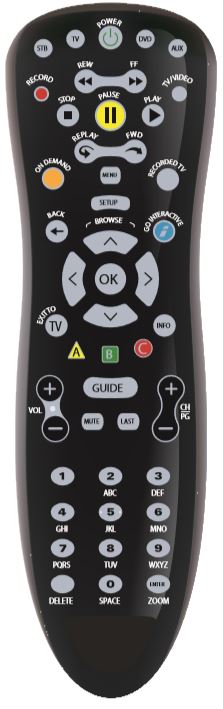
Buttons
 |
Allows you to control your set-top box |
 |
Allows you to control your TV |
 |
Turns the device you are controlling on and off |
 |
Allows you to control your DVD player |
 |
Allows you to control your audio receiver |
 |
Setup is used to program the remote to your TV |
 |
Displays the main menu |
 |
Returns to the previous menu screen |
 |
Not in use |
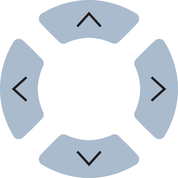 |
Moves selection up, down, left, or right |
 |
Selects the highlighted item |
 |
Exits all menu screens and returns to live TV |
 |
Displays a description of the selected program and recording options |
 |
Displays the search menu |
 |
Displays your favorites menu and setup |
 |
Displays caller ID information |
 |
Records live TV |
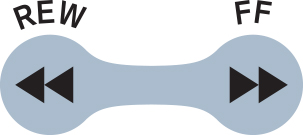 |
Reverses or fast forwards your program |
 |
Scrolls through available TV inputs |
 |
Stops your program |
 |
Pauses your program |
 |
Plays your program |
 |
Reverses 7 seconds at a time of fast forwards 30 seconds |
 |
Displays recorded programs and schedules |
 |
Increases or decreases TV volume |
 |
Displays the interactive guide |
 |
Changes channels or scrolls through guide/menus |
 |
Turns all sounds on or off |
 |
Displays the last 5 channels you viewed/ returns to last channel viewed |